Ascend 950DT/A5 Host RDMA多路径能力分析
本文基于 HCCL e8351f6c 与 HCOMM ba1e77785 版本源码,深入分析 Ascend 950DT/A5 Host RDMA 通路是否具备多路径传输能力、依赖哪些散列输入实现,以及当前开源代码能确认到的工程边界。同时,全文系统梳理了 HostDPU 判定条件、执行流程、多 QP 分片机制、网卡硬件 LB 以及 UDP 源端口散列配置的协同逻辑。
核心结论
基于当前开源代码实现,可以明确以下五项核心事实:
- Host RDMA 已接入实际数据面,算子覆盖有明确边界:950DT/A5 已经形成从 HostDPU 算法选择、HCOMM 资源申请,到 Host Endpoint、Channel、QP 建链、内存注册和 RDMA 读写的主通路实现,并非仅有抽象接口。目前已接入 AllReduce、AllGather、ReduceScatter、Reduce、Broadcast、Scatter、Barrier 等集合通信算子,AllToAll 家族(AllToAll/V/VC)以及点对点 Send/Recv/BatchSendRecv;但并非所有算子均已覆盖,例如 AllGatherV 和 ReduceScatterV 当前尚未实现 HostDPU 算法选择器。
- Host RDMA 由物理拓扑自动选择,不存在全局独立总开关:
CheckHostDPUOnly判定仅检查 RankGraph 的最高通信层。该层必须存在覆盖通信域全部 Rank、包含 Host Endpoint 且严禁混入 Device Endpoint 的 CLOS 拓扑实例;链路通信协议还须为 RoCE,HCOMM 才会创建HostCpuRoceChannel。仓内构造的测试用例涵盖单 SuperPod 两层拓扑(L1 使用 Host RoCE)与多 SuperPod 三层拓扑(L2 使用 Host RoCE、SuperPod 内 L1 使用 Device UB CLOS),真实部署通路以实际 RankGraph 组网为准。 - 具备多 QP 消息分片与两类独立散列输入,但存在端口截断陷阱:
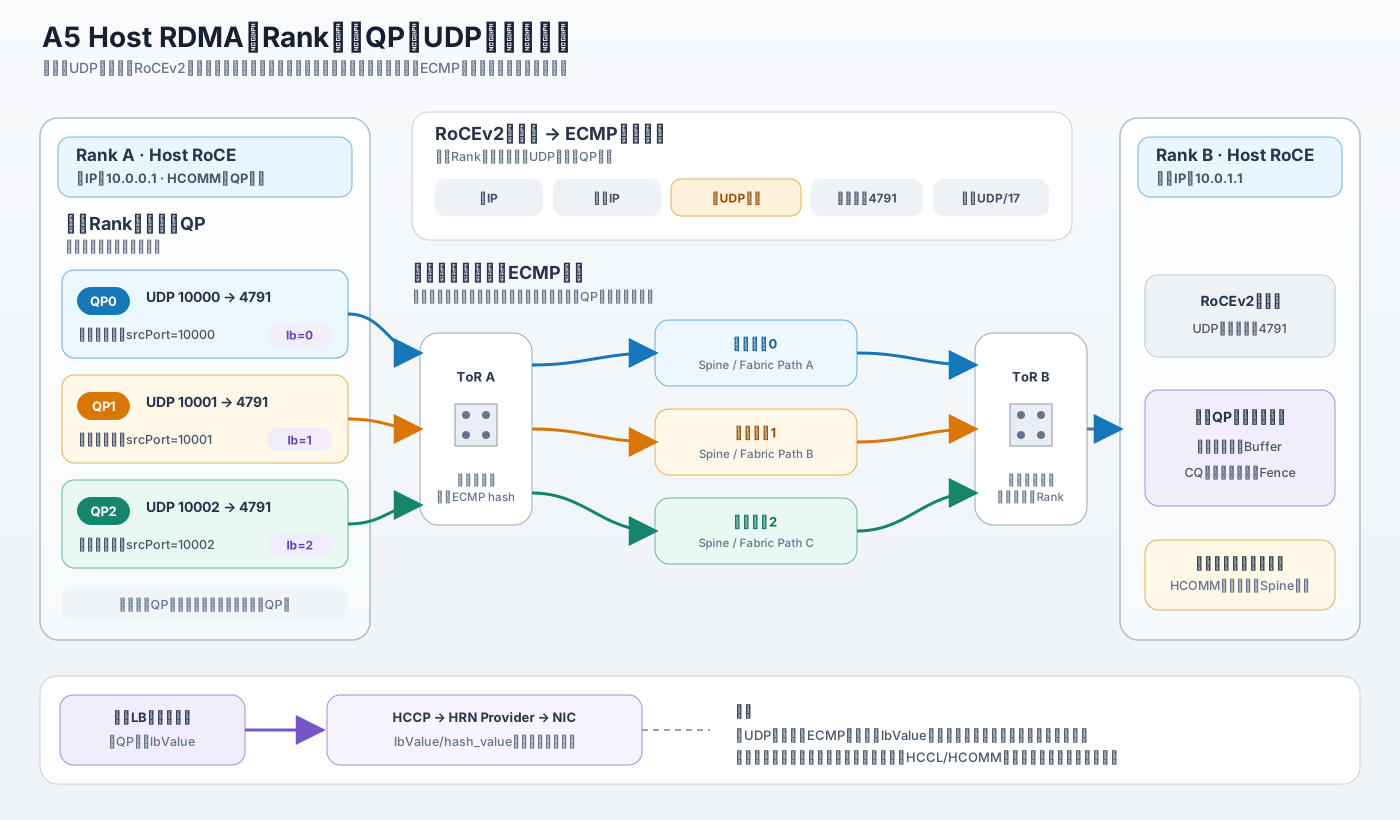
- 每个 QP 可独立配置 RoCEv2 UDP 源端口,供网络交换机进行 ECMP 五元组散列;
- 搭配 Hi1825/SP561 等 HRN 网卡时,可通过 HCCP 为每个 QP 下发独立的硬件散列输入
lbValue(即hash_value)。 - 关键工程陷阱:在默认
queueNum=1下,即便网卡 LB 自动将 QP 数量扩展为lbMax=N,由于源端口列表在建链配置阶段已被裁成 1 项,导致自动扩展出的 N 个 QP 全部退化为使用第 1 个 UDP 源端口。若要让 M 个 QP 真正各自绑定 M 个不同 UDP 源端口,必须显式配置HCCL_RDMA_QPS_PER_CONNECTION=M(或通过/etc/hcomm.cfg/ IP 映射文件提供配置)。
- “支持多路径散列”本质是流级静态 Hash,不保证物理路径分离与动态改路:UDP 源端口和
lbValue仅向网络交换机或网卡内部提供散列因子。数据包在物理网络中的实际承载路径仍取决于网卡硬件、Provider 驱动映射、ECMP 策略和拓扑连线。当前 Host CPU RoCE 通路未启用 HCCP 头文件中定义的原生多路径(MPATH)与自适应路由(Adaptive Routing),亦未发现基于拥塞状态的动态重选路或 Host 多网卡主备切换逻辑。 - QP 级异常检测与重传能力已接入,但 Channel 级自愈尚未闭环:代码已配置 QP 硬件超时重传,并实现 CQ Error 与 DFX 异常上报;但
HostCpuRoceChannel::Clean()和Resume()当前为空实现(直接返回成功),表明 Channel 层尚未实现 QP 自动销毁重建或在线迁移。无法由硬件重传恢复的错误会向上返回,后续如何处置取决于上层通信域逻辑。
Host RDMA 通路、启用与执行
在探讨多路径前,首先需要理清 Host RDMA 在 950DT/A5 上的通路形态、自动触发逻辑与运行时执行闭环。
两种 Host RoCE 使用方式
在 CANN 通信体系中,需要严格区分以下两类 Host RoCE 通路:
| 通路场景 | 执行引擎 | 核心实现类 | 数据面特点 |
|---|---|---|---|
| Host CPU 驱动 RoCE | COMM_ENGINE_CPU |
CpuRoceEndpoint、HostCpuRoceChannel、HostRdmaConnection |
Host CPU 线程通过标准 verbs 接口提交并轮询 RDMA 任务;HCCL 中统称为 HostDPU 通路 |
| NPU 直驱 Host RoCE 网卡 | COMM_ENGINE_AICPU_TS / COMM_ENGINE_AIV |
AicpuTsRoceChannelV2、DevRdmaConnectionV2 |
通过 NDA 机制将网卡 SQ、CQ 和 Doorbell 上下文导出映射到设备侧,由 AICPU/AIV 直驱提交,降低 Host 代理提交开销 |
本文重点分析第一类,即 HCCL 集合通信中 HostDPU 算法采用的 Host CPU + RoCE 通路。在此上下文中:
Host描述 Endpoint 位于主机侧;RoCE描述网络通信协议;CPU描述提交通信任务的执行引擎。三者不可混为一谈。
在实现上,CpuRoceEndpoint 仅接受 DEV_TYPE_950 与 DEV_TYPE_960 设备类型。950/960 设备在创建 HostRdmaConnection 时指定使用 OPBASE_QP_MODE,表明 950DT/A5 属于正式支持范围。
HCCP 在调用链路中的定位
HCCP(Huawei Collective Communication Protocol)并非“Device RoCE”的代名词,而是 HCOMM 内部承接 Socket、RDMA 资源管理和底层驱动调用的通信协议模块。Host RDMA 同样依赖 HCCP 完成 RDMA 设备初始化、MR 注册、CQ/QP 创建、QP 属性修改以及网卡 LB 扩展能力的调用。
HCCP 的封装层、Agent 与 Service 源码已随 HCOMM 开源(位于 src/base_comm/resources/hccp/)。然而,其在运行时通过 HccpDlopen 动态加载的 HRN Provider 专有动态库(如 libhrn5-rdmav34.so 和 libhrn5.so.1)并不在开源仓中。因此,开源代码能够精确确认参数如何组装并传递至 Provider 边界,但无法进一步确认 lbValue 在闭源网卡驱动及微码内部如何映射到具体物理队列或芯片出端口。
Host RDMA 如何被自动选中
Host RDMA 没有提供独立的全局显式总开关,而是由 HCCL 根据集群物理网络拓扑(RankGraph)自动识别并触发。
CheckHostDPUOnly 按以下规则逐级判定当前通信域是否属于 HostDPU 拓扑:
- 多 Server 检查:
topoInfo->serverNum > 1,单机场景直接退出 HostDPU; - 多层拓扑检查:
topoInfo->topoLevelNums > 1,单层拓扑不进入 HostDPU; - 仅检查最高通信层:遍历层级时跳过
netLayer < (topoInfo->topoLevelNums - 1); - CLOS 组网实例:最高层中查找
COMM_TOPO_CLOS类型的拓扑实例; - 全 Rank 覆盖:候选 CLOS 实例覆盖的 Rank 数量必须等于通信域总卡数(
rankNum == topoInfo->userRankSize); - 无 Device 链路排除项:最高层拓扑实例中一旦发现任何
ENDPOINT_LOC_TYPE_DEVICE的 Endpoint,立刻判定非 HostDPU 并退出; - Host 节点命中:至少发现一个
ENDPOINT_LOC_TYPE_HOST的 Endpoint,将hostDPUOnly置为 true。
这段判定只关注最高层的 Endpoint 物理归属与 CLOS 覆盖完整性,本身不校验通信协议。一旦判定为 HostDPU,AutoSelector 立即配置执行引擎:
1 | opParam.opExecuteConfig = OpExecuteConfig::HOSTCPU; |
在后续资源申请阶段,HCCL 会针对具体链路按本地 Endpoint 类型进行拆分:Device Endpoint 使用 COMM_ENGINE_AICPU_TS,Host Endpoint 使用 COMM_ENGINE_CPU。当且仅当 Host Endpoint 的 Channel 协议为 RoCE 时,HCOMM 工厂方法才会实例化 HostCpuRoceChannel。因此,“通信域命中 HostDPU 算法”与“某层具体链路实例化为 Host RDMA 通道”是前后衔接但层级不同的两步。
- HostDPU 拓扑判定 CheckHostDPUOnly
- 自动选择器 AutoSelectorBase::Select
- HCOMM 通道工厂 ChannelFactory::CreateChannel
L0/L1/L2 分层拓扑与测试用例
为验证 HostDPU 代码路径,仓内在 LLT/ST 仿真环境(topo_model.cc)中构造了典型的分层组网模型。理解该模型有助于明晰 Host RoCE 在不同组网规模下的部署位次:
| 网络层 | Endpoint 归属 | 通信协议 | 拓扑类型 | 对应典型物理范围 |
|---|---|---|---|---|
| L0 | DEVICE |
UB_CTP / UB_MEM |
由具体框内 RankGraph 决定 | 单 Server 框内 NPU 点对点及局部聚合传输 |
| L1(多 SuperPod 三层用例) | DEVICE |
UB_CTP(兼容宏 UBC_CTP) |
CLOS |
SuperPod 内部跨 Server 间高速交换网 |
| L2(多 SuperPod 三层用例) | HOST |
ROCE |
CLOS |
跨 SuperPod 集群顶层网络,由 Host RoCE 承载 |
| L1(单 SuperPod 两层用例) | HOST |
ROCE |
CLOS |
单 SuperPod 内部跨 Server 顶层网络,直接由 Host RoCE 承载 |
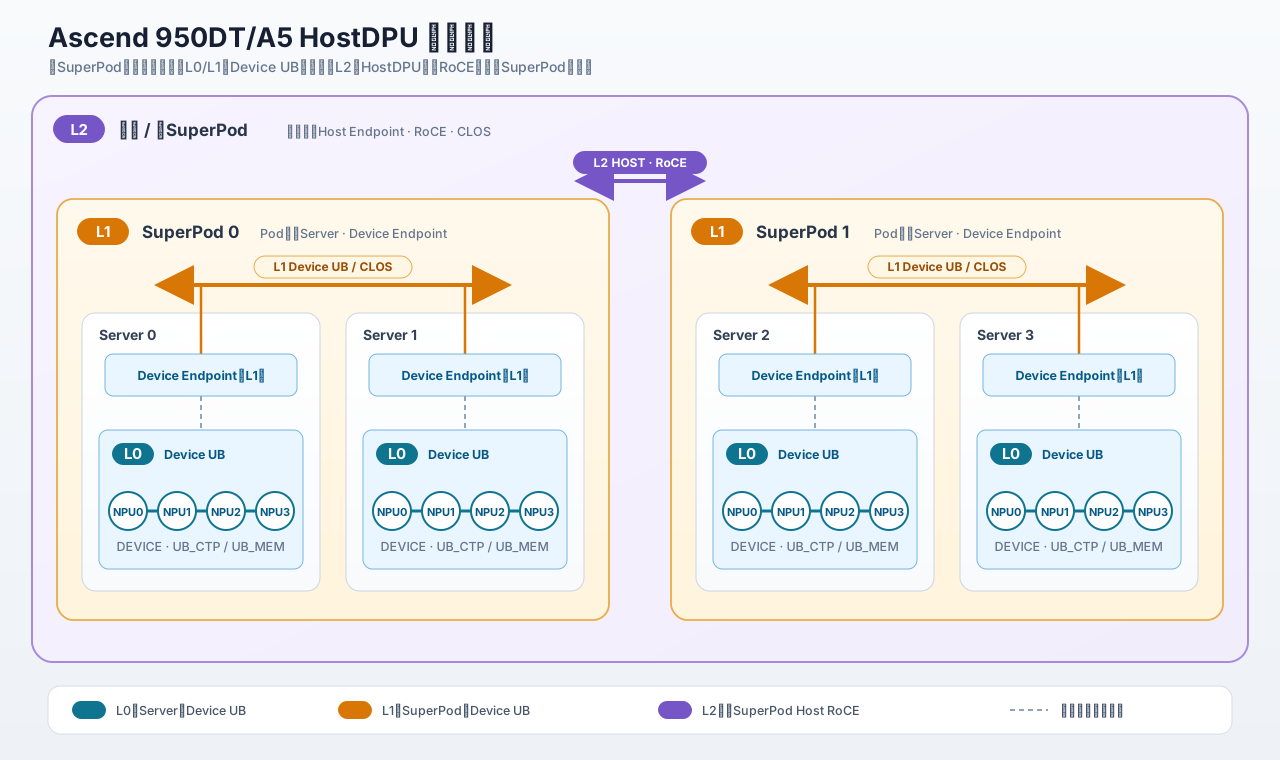
注意:拓扑层级为逻辑模型。 L0/L1/L2 是 RankGraph 中的逻辑网络层(NetLayer),并非固定绑定某个物理设备。在仓内单 SuperPod 两层测试用例中,最高层 L1 构造成 Host RoCE,因而 SuperPod 内跨 Server 通信直接走 Host RoCE;而在多 SuperPod 三层测试用例中,L1 是 Device 侧 UB CLOS,L2 才是 Host RoCE。生产环境中最终是否使用 Host RoCE,以部署时集群生成的实际 RankGraph 为准。
算子覆盖矩阵
通过对各算子 AutoSelector 中 SelectDPUAlgo 覆写情况的全面检索,当前算子支持矩阵如下:
| 算子类别 | 算子名称 | 已接入的代表性 HostDPU 算法 | 支持状态 |
|---|---|---|---|
| 集合通信 | AllReduce | DpuAllReduceSequenceMeshNHR、DpuAllReducePipeLineMeshNHRNHR |
支持 |
| AllGather | DpuAllGatherSequenceMeshNHR、DpuAllGatherPipeLineMeshNHRNHR |
支持 | |
| ReduceScatter | DpuReduceScatterSequenceMeshMesh、DpuReduceScatterPipeLineMeshNHRMesh |
支持 | |
| Reduce | DpuReduceSequenceMeshNHR、三层 Pipeline 实现 |
支持 | |
| Broadcast | DpuBroadcastSequenceMeshNHR、三层 Pipeline 实现 |
支持 | |
| Scatter | DpuScatterSequenceMeshNHR、三层 Pipeline 实现 |
支持 | |
| Barrier | DpuBarrierSequenceMeshNHR |
支持 | |
| AllGatherV | 未实现 SelectDPUAlgo(基类直接返回 NOT_MATCH) |
自动选择器未覆盖 | |
| ReduceScatterV | 未实现 SelectDPUAlgo(基类直接返回 NOT_MATCH) |
自动选择器未覆盖 | |
| AllToAll 家族 | AllToAll | DpuAllToAllSoleMesh |
支持 |
| AllToAllV | DpuAllToAllVSoleMesh |
支持 | |
| AllToAllVC | DpuAllToAllVCSoleMesh |
支持 | |
| 点对点通信 | Send / Recv | 跨 Endpoint 异构链路走 DpuSendSoleHost/DpuRecvSoleHost,其余走 DpuSendSoleMesh/DpuRecvSoleMesh |
支持 |
| BatchSendRecv | DpuBatchSendRecvSoleMesh |
支持 |
由此可见,不能简单概括为“所有集合通信均支持 Host RDMA”。在当前版本中,AllGatherV 与 ReduceScatterV 的自动选择器尚未提供 HostDPU 选择分支。
HostDPU 任务执行流水线
HostDPU 的执行并非算法线程直接调用裸 verbs API,而是采用了“设备侧调度编排 + 共享内存控制桥 + Host 侧并发通信”的协同架构:
sequenceDiagram
autonumber
participant A as HCCL / AICPU编排
participant B as HCOMM任务桥
participant C as HostDPU模板
participant D as HostCpuRoceChannel
participant E as 对端Rank

rect rgb(239, 246, 255)
  Note over A,D: 阶段 1:资源准备
  A->>B: GetAlgResDPU:申请 100MiB DPUTAG 共享内存
  Note over B: 前半区 NPU→DPU 请求 / 后半区 DPU→NPU 响应
  A->>D: 按 Endpoint 创建 Channel<br/>Device→AICPU_TS, Host→CPU
end

rect rgb(245, 243, 255)
  Note over A,C: 阶段 2:任务控制路径
  A->>B: 序列化 DPURunInfo(模板名、参数、Channel、Rank、超时)
  A->>B: HcommSendRequest(npu2DpuShmemPtr)
  B->>C: HcclLaunchDPUKernel(request)
  activate C
  C->>C: 反序列化 → 查找模板 → DPUKernelRun
  par Device Endpoint
    A->>A: AICPU_TS 执行设备侧搬运
  and Host Endpoint
    C->>D: 调用 Host 侧 HCOMM 原语
  end
end

rect rgb(236, 253, 245)
  Note over C,E: 阶段 3:Host RDMA 数据路径
  E-->>D: NotifyRecord(NOTIFY_IDX_ACK)<br/>接收缓冲区就绪
  C->>D: NotifyWait(NOTIFY_IDX_ACK)
  C->>D: WriteWithNotify(NOTIFY_IDX_DATA_SIGNAL)
  D->>E: RDMA_WRITE_WITH_IMM<br/>数据写入远端 RMA Buffer 并携带 Notify ID
  C->>D: NotifyRecord(NOTIFY_IDX_FIN_ACK)
  C->>D: ChannelDrain
  C->>C: HcommFenceOnThread
  E->>E: NotifyWait(NOTIFY_IDX_DATA_SIGNAL)<br/>确认数据接收完成
  E->>E: NotifyWait(NOTIFY_IDX_FIN_ACK)<br/>确认发送端排空
end

rect rgb(255, 247, 237)
  Note over A,C: 阶段 4:完成收口
  C-->>B: 模板返回执行状态
  deactivate C
  B-->>A: HcommWaitResponse(dpu2NpuShmemPtr)
  A->>A: 校验 msgId 并继续后处理
end
- 共享内存分账:HCCL 在
GetAlgResDPU中申请 100MiB 且打上DPUTAG标记的设备共享内存,以DPU2NPU_SHMEM_RATIO = 2平分为前半区(NPU→DPU 请求)和后半区(DPU→NPU 响应)。 - 任务描述符下发:算法将执行上下文
DPURunInfo(包含模板名、切分参数、Channel 句柄、Rank 与超时配置)序列化写入请求区,通过HcommSendRequest投递至 Host 侧。 - 模板派发与协同:Host 侧
HcclLaunchDPUKernel反序列化请求,经InsAlgTemplateRegistry获取对应模板实例并调用DPUKernelRun。此时 Device 侧可并行处理本节点 UB 内存搬运,Host 侧则由 Host CPU 提交通信。 - 三段式握手与数据传输(普通
SendRecvWrite路径):- Step Sync(就绪确认):接收端调用
NotifyRecord(NOTIFY_IDX_ACK),发送端调用NotifyWait(NOTIFY_IDX_ACK),确保远端目标内存就绪; - 数据写入:发送端调用
HcommWriteWithNotifyNbiOnThread下发数据写,尾块携带NOTIFY_IDX_DATA_SIGNAL; - Fin Sync 与 Drain(完成排空):发送端触发
NOTIFY_IDX_FIN_ACK并调用ChannelDrain与线程 Fence;接收端先后等待NOTIFY_IDX_DATA_SIGNAL与NOTIFY_IDX_FIN_ACK确认数据完全可见。
- Step Sync(就绪确认):接收端调用
- 任务收口:模板执行结束后向响应区写入状态,AICPU 侧通过
HcommWaitResponse校验msgId并结束算子调度。
上述时序图展示的是普通 SendRecvWrite 包装器。部分 NHR 算法使用 DpuBatchTransfer 优化路径,将 STEP_SYNC、批量 WriteWithNotify、Drain/Fence 与 DATA_SIGNAL 等待组合执行,不使用 NOTIFY_IDX_FIN_ACK;因此不能把图中的 FIN_ACK 流程视为所有 HostDPU 算法的统一时序。
控制路径与业务数据路径分离。
HcommSendRequest/HcommWaitResponse在 100MiB DPUTAG 共享内存中传递任务元数据;Host RDMA 阶段的业务载荷则通过已注册的 RMA Buffer 与 RDMA QP 传输,不经 DPUTAG 任务共享内存中转。
异步建链状态机
HostCpuRoceChannel 采用异步状态机设计,每次调用 Connect() 驱动当前阶段向前推进:
stateDiagram-v2
direction TB
[*] --> INIT
INIT --> SOCKET_OK: CheckSocketStatus()<br/>建立或复用辅助 Socket(默认端口 60001)
SOCKET_OK --> CAP_EXCHANGED: ExchangeCapability()<br/>交换版本、通信魔数与特性能力
CAP_EXCHANGED --> QP_CREATED: CreateQp()<br/>按 queueNum 或网卡 LB 能力创建 CQ/QP
QP_CREATED --> DATA_EXCHANGE: ExchangeData()<br/>交换 QPN、PSN、GID、MR 地址/RKey 等
DATA_EXCHANGE --> QP_MODIFIED: ModifyQp()<br/>配置 SL、TC、重传、源端口与 lbValue
QP_MODIFIED --> READY: SyncAfterModifyQp()<br/>每个 QP 预投递 16 个 Receive WQE
READY --> [*]
带外 TCP Socket 仅用于能力协商、元数据交换与状态同步,通道进入 READY 状态后,所有业务数据与通知均在 RDMA QP 上传输。
内存注册与 D2N=UB 代理机制
Host RDMA 读写的源地址和目的地址必须严格落在已注册并交换的 RMA Buffer 范围内,否则 FindLocalBuffer 或 FindRemoteBuffer 会返回 HCCL_E_NOT_FOUND。
CpuRoceEndpoint 以 {devPhyId, COMM_PROTOCOL_ROCE, ENDPOINT_LOC_TYPE_HOST, ipAddr} 作为唯一键缓存复用底层 RDMA 上下文,本地 MR 亦在此粒度进行管理。在 950DT/Hi1825 架构下,Device 内存注册存在一个特殊设计:
- 普通内存注册:Host 内存及常规 Device 内存直接按用户传入的连续虚拟地址区间
[va, va+size]进行注册。 - D2N=UB 别名注册策略:当 Host 网卡与 NPU 之间的 Device-to-NIC(D2N)数据通路采用 UB 总线时,底层
ubdevshm驱动如果对重叠 VA 进行重复登记会直接返回错误(如-17)。由于当前 HCCP 缺乏直接探测 D2N 物理总线类型的接口,代码暂以capabilities_.lbMax > 0作为命中 Hi1825/UB 架构的代理条件。 - 对满足条件的 Device 内存,
RoceRegedMemMgr会调用aclrtMemGetAddressRange获取底层整段aclrtMalloc分配的大内存块,针对整段 allocation 注册物理硬件 MR 并建立引用计数;用户传入的实际数据子区间仅作为共享同一物理 LKey/RKey 的 Alias Buffer 导出。
代码注释已明确标明:该代理逻辑是当前版本的过渡设计,未来 HCCP 提供专有 D2N/UB 探测接口后将予以替换。
数据操作与通知语义
针对标准对称 Host CPU RoCE 模式,通道实现了完备的原语支持:
1. Write 与 Read 分片调度
CpuRoceEndpoint 目前将单次 RDMA 操作上限暂定为 1GiB(RDMA_MAX_WR_LENGTH = 1GB)。数据发送时,首先按 1GiB 切割成若干 Chunk,每个 Chunk 再根据参与传输的 QP 数量执行 Striping 分片。多 QP 开启时,HCCL_MULTI_QP_THRESHOLD 决定了实际承载有效载荷的 QP 个数:
当初始平均切片长度满足 tileLen != 0 && tileLen < qpThreshold 时,代码按下式缩减实际承载数据的 QP 数量:
若 tileLen == 0(即数据长度小于 QP 数量),该缩减逻辑不会进入,useQpNum 保持为 actualQpNum;此时前面的 QP 获得 0 长度切片,尾 QP 承载剩余数据。
对于未分配到有效载荷的剩余空闲 QP(),仍会提交长度为 0 的 Signaled WR。此设计至关重要:由于 WaitForWqeCompletion() 需要轮询等待通道内所有 QP 的 wqeNums_[i] 计数清零,为所有 QP 统一投递 Signaled WR 能确保多 QP 的完成状态推进严格保持步调一致,避免特定 QP 挂起引发死锁。
2. NotifyRecord 与 NotifyWait
NotifyRecord:向通道内所有 QP 提交一条长度为 0、携带 32 位 Immediate Data(存放目标 Notify ID)的 RDMA 写操作;NotifyWait:遍历通道内所有 QP 对应的recvCq,逐一轮询并校验出队的wc.imm_data == dpuNotifyId;- 滑动信标补齐:单次
NotifyWait完成后,通道会立即调用IbvPostRecv()为每个 QP 各自补投递 1 个 Receive WQE,使 QP 的接收缓冲池始终维持在 16 个信标深度; - 若轮询超时,直接返回
HCCL_E_TIMEOUT;若 CQE 返回异常,则提取本地/远端 Server、Device ID、IP 及 QP 状态并上报 DFX。
3. WriteWithNotify
大于 1GiB 的前置数据块采用普通 RDMA_WRITE 发送;最后一个尾块在所有 QP 上调用 RDMA_WRITE_WITH_IMM。承载数据的 QP 携带切片数据并打上 Imm Notify,空闲 QP 发送长度为 0 的 Imm Notify,保证接收端每个 QP 都能收到一致的同步信号。
4. ChannelDrain 与 ChannelFence
- 两者均通过
WaitForWqeCompletion()轮询等待所有 QP 的所有在途 Send WQE 完全出队清空; ChannelFence在排空后将fenceFlag_置为 true,使得后续第一条投递的 RDMA WR 自动附带IBV_SEND_FENCE标志;- HCCL HostDPU 传输包装器优先调用轻量级的 Channel Drain,并在其后叠加线程级
HcommFenceOnThread。为向后兼容低于 CANN 9.2.0.2 的老版本,HCCL 会自动将 Host Channel Drain 回退映射为 Channel Fence。
多QP、LB 与多路径能力
本节是全文的核心:厘清数据分片多 QP、网卡硬件 LB 与 RoCEv2 UDP 源端口三者的机制定位,进而评估其多路径能力与边界。
| 机制维度 | 作用实体 | 核心设计意图 |
|---|---|---|
| 多 QP 数据分片 | HCOMM 数据面 | 单个通信链路内部并行建立多个 RDMA QP,按消息大小阈值切片并行发送,提高链路并行度与带宽利用率 |
网卡 LB (lbValue) |
HCCP 与 HRN Provider | 在 QP 属性中注入 hash_value,为网卡硬件/驱动提供负载均衡输入;其内部映射方式未开源 |
| UDP 源端口散列 | IP 传输层 (RoCEv2) | 为每个 QP 分配不同的 UDP Source Port,作为网络交换机 ECMP 选路的五元组输入因子 |
QP 数量解析与优先级
HCCL_RDMA_QPS_PER_CONNECTION 定义了 Rank 间单个逻辑 Channel 期望分配的 QP 数量(合法范围 1~32,默认 1,推荐 )。HCCL_MULTI_QP_THRESHOLD 定义了每个数据 QP 的最小切片阈值(范围 1~8192KB,默认 512KB)。
在 A5 CommunicatorV2 框架下,Channel 的 queueNum 按照以下绝对优先级逐级解析(见 ResolveQueueNum):
flowchart TD
A{"调用方是否显式指定<br/>HcclChannelDesc.roceAttr.queueNum?"}
B["采用调用方配置"]
C{"Host RoCE 的 /etc/hcomm.cfg<br/>是否配置 QP 数?"}
D["采用 hostMultiQpConfig.GetQpCount(devicePhyId)"]
E{"本端/远端 IP 对是否命中<br/>MultiQpSrcPort.cfg?"}
F["采用 IP 对对应的端口数量"]
G["采用 HCCL_RDMA_QPS_PER_CONNECTION<br/>未配置时默认为 1"]
A -- 是 --> B
A -- 否 --> C
C -- 是 --> D
C -- 否 --> E
E -- 是 --> F
E -- 否 --> G
建链对称性约束: 建链阶段通信双方会严格校验对端声明的 QP 数量。若通信双方环境变量不一致,或两端网卡硬件 LB 能力差异导致扩展出的实际 Connection 数量不同,建链会报错退出,不会自动协商取较小值降级运行。
网卡硬件 LB
950DT/A5 搭配 Hi1825/SP561 网卡时的 LB 交互时序如下:
- 能力探测:
CpuRoceEndpoint::GetCapabilities调用 HCCP 的RaGetLbMax; - Provider 符号解析:HCCP 动态绑定 HRN Provider 动态库并调用
roce_get_qp_num。若符号不存在,优雅回退为lbMax = 0; - 分配哈希因子:
HostCpuRoceChannel::BuildConnection遍历各连接,为第 个 QP 赋值qpInfo.lbValue = i % lbMax; - 属性下发:QP 推进至 RTS 状态后,
HostRdmaConnection::ModifyQp显式调用RaSetQpLbValue(qpHandle, lbValue),最终由 Provider 的roce_set_qp_lb_value写入网卡。
根据配置 QP 数与网卡 lbMax 的不同组合,实际 QP 数量与 lbValue 的对应关系如下:
上层解析 queueNum |
网卡能力 lbMax |
实际创建 QP 数量 | 各 QP 分配的 lbValue |
行为解释 |
|---|---|---|---|---|
| 1 | 0 | 1 | 保持默认 -1 |
不支持 LB,仅建立单 QP,不调用 LB 接口 |
| 1 | 0 至 N-1 |
由 LB 能力将单 QP 自动扩展为 个 QP,并依次分配 lbValue |
||
| 0 | 保持默认 -1 |
不支持 LB,普通多 QP 分片,各 QP 无网卡硬件哈希因子 | ||
维持上层指定的 个 QP(不会扩展为 ),按模分配 lbValue |
Host RDMA UDP 源端口与 ECMP 散列
950 系列支持通过环境变量 HCCL_HOST_RDMA_UDP_PORTS_LIST 按 NPU 物理设备 ID 为 Host RoCE QP 分配指定的 UDP 源端口:
1 | # 格式:<phy_dev_id>:<port1>,<port2>...;<phy_dev_id>:<port1>,<port2>... |
配置必须遵循以下规则:
phy_dev_id须为非负十进制整数,同一物理设备 ID 严禁重复;- 端口号必须位于 ,应避开系统保留端口 ;
- 单个设备端口数量上限为 32 个,环境变量总字符长度上限为 32KiB;
- 格式错误会导致通信域初始化异常退出。
1. queueNum、LB 与源端口协同组合(关键陷阱揭秘)
在 HCOMM 实现中,“配置阶段的 QP 数”与“Channel 内部实际建立的 QP 数”之间存在处理时序差:
- Step 1:HCOMM 首先解析出 Channel 描述符中的
channelDesc.roceAttr.queueNum(若未显式指定,默认为 1); - Step 2:
RoceChannelDescConfigurator::FillRoceSrcPortList根据上述queueNum调整并裁剪端口缓存:若配置的端口过多则截断,过少则循环复用,最终缓存数组大小严格等于queueNum; - Step 3:进入
HostCpuRoceChannel::BuildConnection,查询网卡能力lbMax。仅当queueNum == 1 && lbMax > 0时,创建循环次数才从 1 自动扩展为lbMax; - Step 4:循环内部为第 个 QP 赋值源端口:
1
qpInfo.udpSport = srcPortList[i % channelDesc_.roceAttr.queueNum];
这形成了一个需要特别注意的实现组合约束:
HCCL_RDMA_QPS_PER_CONNECTION |
HCCL_HOST_RDMA_UDP_PORTS_LIST |
网卡 LB 能力 | 实际结果分析 |
|---|---|---|---|
未配置(queueNum 保持 1) |
未配置 | 不支持 | 创建 1 个 QP,udpSport = 0,走网卡驱动默认端口行为 |
未配置(queueNum 保持 1) |
配置多个端口(如 个) | 不支持 | 创建 1 个 QP,仅使用第 1 个端口;其余 个端口被截断丢弃 |
未配置(queueNum 保持 1) |
配置多个端口(如 个) | lbMax = N |
虽然网卡能力触发创建了 个 QP,但配置阶段 srcPortList 已被裁成 1 项,计算 i % 1 时恒为 0,因此 个 QP 全部使用第 1 个源端口;仅 lbValue 各不相同 |
| 配置为 | 未配置 | 任意 | 创建 个 QP,udpSport = 0;若支持 LB 则下发不同 lbValue |
| 配置为 | 配置 个端口 | 不支持 | 创建 个 QP; 循环复用端口, 截取前 个端口 |
| 配置为 | 配置 个端口 | lbMax = N |
实际创建 个 QP; 时循环复用端口, 时截取前 个,同时每 QP 下发 lbValue = i % N。只有 且前 项互不相同时,才能保证每个 QP 的 udpSport 不同 |
配置建议: 如果希望建立 个 QP 并使其分别获得不同的 UDP 源端口,不能仅依赖网卡 LB 自动扩展。需要将
queueNum显式解析为 (例如配置HCCL_RDMA_QPS_PER_CONNECTION=M,或通过/etc/hcomm.cfg、IP 对配置得到同一数量),并保证提供至少 个互不相同的端口。
2. ECMP 五元组哈希机制
RoCEv2 数据包在 IP 层的五元组为:源 IP、目的 IP、源 UDP 端口、目的 UDP 端口(固定 4791)、IP 协议号(固定 17 UDP)。在固定的 Rank 对之间通信时,两端 IP、目的端口及协议号均不可变,因此修改源 UDP 端口是主机端为交换机 ECMP 提供散列输入的最主要途径。
但必须指出:源端口不同仅向交换机哈希桶提供了离散输入;各 QP 最终是否会落到不同交换机物理链路上,取决于交换机具体的逐流哈希算法、网络拓扑等宽情况以及哈希碰撞几率。
3. 源端口的最终覆盖层级
源端口的生效遵循“环境解析”与“通道绑定”两级映射:
- 设备级端口基线:首先解析
HCCL_HOST_RDMA_UDP_PORTS_LIST;若本地存在/etc/hcomm.cfg,其中配置的同物理设备项(须同时提供udp_port_mode_<id>=multi_qp、multi_qp_count_<id>及multi_qp_udp_ports_<id>)会覆盖该物理设备对应的环境变量配置; - Channel 级分配:创建具体 Channel 时,首先使用上述物理设备的端口列表;若未获取到,再按本地/远端 IP 对查询
MultiQpSrcPort.cfg;若仍未命中,向底层传递udpSport = 0,由 Provider 驱动自行填充。
- HCCL_HOST_RDMA_UDP_PORTS_LIST 用户指南
- HCCL_RDMA_QPS_PER_CONNECTION 用户指南
- HCCL_MULTI_QP_THRESHOLD 用户指南
- HostMultiQpConfig 源码实现
- RoceChannelDescConfigurator 端口绑定源码
多路径能力边界与最终判定
综合代码剖析,Ascend 950DT/A5 Host RDMA 在多路径传输维度能够确认的能力边界如下:
| 多路径能力维度 | 开源代码可确认程度 | 核心依据与工程现实 |
|---|---|---|
| 多 QP 数据切片 | 已确认支持 | 单 Channel 内支持创建多个 QP,按消息阈值切片并行发送,所有 QP 统一参与完成与通知同步 |
| UDP 源端口 ECMP 散列 | 已确认支持 | 每 QP 均可下发独立源端口,为网络交换机 ECMP 提供五元组散列输入;实际物理路径取决于网络拓扑 |
| Hi1825/HRN 网卡硬件 LB | 已确认支持 | 接口层下发每 QP 的 lbValue(即 hash_value);具体网卡硬件路由映射逻辑封装在闭源驱动中 |
| 网卡原生子流多路径 (MPATH) | 当前通路未启用 | HCCP 依赖头文件 ibv_extend.h 虽定义有 IBV_LB_MODE_MPATH、flowlet_pkg_num 及 path_num 等字段,但 RsTypicalQpModifyExtend 下发的扩展属性掩码中仅设置了 UDP 源端口与 Hyper RoCE 特性 |
| 自适应路由 (Adaptive Routing) | 当前通路未启用 | 头文件中定义有 IBV_LB_MODE_AR 与端口轮询逐包配置,但在 QP 建链与属性修改代码中未下发相应属性掩码 |
| 物理多网卡主备切换 | 单通道内未实现 | 单个 CpuRoceEndpoint 仅绑定单个物理网卡和单个 Host IP 句柄,通道内多 QP 共享该句柄;当前未接入 RaRdevInitWithBackup 双网卡机制 |
| 动态拥塞感知改路 | 未发现支持 | 仅支持按静态消息大小切片,不存在根据网络链路实时拥塞指标动态修改 QP、lbValue 或源端口的软件逻辑 |
最终结论:
Ascend 950DT/A5 Host RDMA 已经具备多 QP 数据分片能力,并可通过 UDP 源端口与网卡 lbValue 提供静态路径散列因子;在支持 ECMP 的网络架构中,这些因子可使多 QP 流量具备分散到多条网络路径的条件。该能力属于流级(QP 级)静态散列选路,不能保证各 QP 必然落到不同物理路径。从当前开源代码看,Host CPU RoCE 通路也未启用网卡原生 MPATH、自适应路由、动态拥塞感知选路或 Host 多网卡主备故障切换。
关联机制与工程边界
Host NIC 与 Device NIC 异构混合模式
在 HostCpuRoceChannel::Connect() 协商阶段,双方会交换通信栈能力。如果对端声明了 COMM_STACK_TRANSPORT_IBVERBS,通道将转入 Host NIC — Device NIC 混合模式(源码中命名为 Hybird)。Send/Recv 选择器中的 DpuSendSoleHost 与 DpuRecvSoleHost 即为此类跨节点异构链路的使用者。
混合模式与标准对称 Host CPU RoCE 存在本质区别:
- 单 QP 传输:退化为仅使用第 0 个 Connection/QP;
- 内存模型差异:重新注册用户 Buffer,并额外交换 2 个数据 Buffer 与 3 个 4 字节的 Host Notify 内存;
- 链式通知协议:
WriteWithNotify不使用RDMA_WRITE_WITH_IMM,而是由一条数据 RDMA Write 串联一条写入对端 Notify 内存的链式 RDMA Write 组成; - 内存原子轮询:
NotifyWait通过在本地原子轮询特定 Notify 内存字实现,默认超时 30 秒;完全不依赖标准模式下的 Receive WQE 和 recv CQ 机制。
这是一条专为兼容旧版 NPU RoCE/HCCP 设备端通信栈而设计的异构降级链路,其实现细节不代表 950 对称 HostDPU 主通路。
单边通信与 HIXL 模式
当 HcommChannelDesc.exchangeAllMems = true 时,通道进入单边通信模式(注释标为 HIXL 使用;HCCL 集合通信固定为 false)。
该模式跳过了常规 Channel 的逐个内存句柄传递流程,改为直接交换 Endpoint 上的全量已注册内存;非 Client 端会按需拉起监听 Socket。特别需要注意的是:在单边模式下,自动源端口分配机制被强制旁路,udpSport 固定下发为 0。因此在评估集合通信 Host RDMA 时,不应混入单边通信的参数规则。
QoS、重传与异常处理边界
Host RDMA 在 QP 属性修改阶段统一注入 RoCE 网络质量参数:
| 配置参数 | 默认值 | 950DT / Hi1825 规范与约束 |
|---|---|---|
HCCL_RDMA_TC |
132 | 取值 且必须为 4 的整数倍;对应 IP 头部 ToS 字段,除以 4 即为 DSCP(默认值对应 DSCP 33) |
HCCL_RDMA_SL |
4 | 取值 ,必须与交换机及网卡配置的 PFC 优先级严格匹配 |
HCCL_RDMA_RETRY_CNT |
7 | 取值 ,QP 硬件自动重传次数 |
HCCL_RDMA_TIMEOUT |
20 | 搭配 Hi1825/SP561 时文档标准范围 ,默认 20(小于 18 或大于 31 均回退按 18 处理);最小超时计算公式为 |
运行时具备以下异常保护与 DFX 诊断:
- verbs 提交阶段细分返回码:区分队列溢出(
ENOMEM/HCCL_E_AGAIN)与网络错误(HCCL_E_NETWORK); - send/recv CQ 轮询检测
ibv_wc_status、Opcode 及 Vendor Error; - NotifyWait、Drain 和 Fence 操作均受执行超时约束;
- CQ 发生异常时,自动收集本地/远端 Server、Device ID、IP 以及 QP 状态,并触发 DFX 任务结束诊断。
容错恢复的局限性:
HostCpuRoceChannel::Clean() 和 Resume() 目前直接返回 HCCL_SUCCESS。这意味着在当前版本中,一旦通信通道遭遇无法依靠 QP 硬件重传恢复的故障,HCOMM 无法在 Channel 级别自动重建 QP 或无缝重哈希改路;错误会向上返回,后续是否重建通信域由上层恢复策略决定。
NDA 设备直驱模式对比
除 Host CPU 驱动外,950 还支持 AICPU_TS 或 AIV 直接下发任务给 Host RoCE 网卡(即 NDA 通路)。该场景下本地 Endpoint 依然是 CpuRoceEndpoint(表示网卡位于 Host 侧),但 Channel 变为 AicpuTsRoceChannelV2。
由 DevRdmaConnectionV2 查询底层 RaNdaGetDirectFlag 并区分 DMA 模式:
DIRECT_FLAG_PCIEQBUF_DMA_MODE_DEFAULT(PCIe 总线模式);DIRECT_FLAG_UBQBUF_DMA_MODE_INDEP_UB(UB 总线模式)。
值得注意的是,当前设备侧 RdmaConnLiteV2 明确写明:AICPU NDA 暂不支持 PCIe 模式,仅在 UB 模式下加载 Rdma1825Ops;而 AIV 则支持 PCIe NDA。因此在定位现场问题时,必须结合 Endpoint 位置、Channel 协议、CommEngine 与 NDA DirectFlag 四个维度综合判定。
生产部署排查核对清单
在生产集群中,若要确认业务流量是否真正进入 Host RDMA 以及多路径是否按预期生效,可依据以下步骤逐步核验:
- 核对拓扑命中:查看初始化日志中
[CheckHostDPUOnly],确认最高通信层是否为全覆盖、纯 Host Endpoint 的 CLOS 拓扑,无 Device Endpoint 干扰; - 核对算法与通道:确认选中的算子算法名为
Dpu*(如DpuAllReduceSequenceMeshNHR),Channel 实例确认进入HostCpuRoceChannel; - 核对 QP 数量来源:检查
queueNum日志,确认其最终解析自显式 Channel 配置、/etc/hcomm.cfg、MultiQpSrcPort.cfg还是环境变量HCCL_RDMA_QPS_PER_CONNECTION; - 核对网卡 LB 能力:查看
RaGetLbMax日志返回值是否 ;检查HostCpuRoceChannel::BuildConnection日志中每个 QP 的lbValue(0 至 ); - 核对 UDP 源端口分布:检查每 QP 的
udpSport日志输出。重点警惕:若发现所有 QP 的源端口完全相同,检查是否误用了“默认queueNum=1+ 网卡自动扩展 LB”的组合;如需离散端口,须显式配置HCCL_RDMA_QPS_PER_CONNECTION; - 核对交换机 ECMP 配置:确认物理交换机针对 RoCEv2(UDP 4791)开启了基于五元组(特别是源 UDP 端口)的哈希算法;
- 核对物理网络流量:在业务运行期间采样网络交换机上联端口的流量计数器(PFC / SNMP / 遥测计数)。单靠 HCCL 日志显示多 QP 仅能证明软件层已下发散列因子,物理层是否真正负载均衡须以交换机物理端口流量分布为准。